
GSA News Reader: Ultimate RSS News Feed Reader & Monitor
GSA News Reader is a powerful, user-friendly RSS feed reader designed to track both traditional feeds and standard websites. Simply add any URL, and the software will automatically monitor the webpage for updates, keeping you informed in real time.

The Story Behind GSA News Reader
When OperaMail was discontinued, our development team lost its favorite RSS tool. To fill that gap, we engineered a custom, high-performance RSS reader for internal use. It proved so reliable and efficient that we decided to launch it publicly for everyone looking for a robust news-tracking solution.
- Universal Tracking: Works with RSS, ATOM, and standard HTML web pages.
- Ad-Free Reading: Enjoy a clean layout without distracting online advertisements.
- Desktop Alerts: Get notified instantly when fresh content is published.
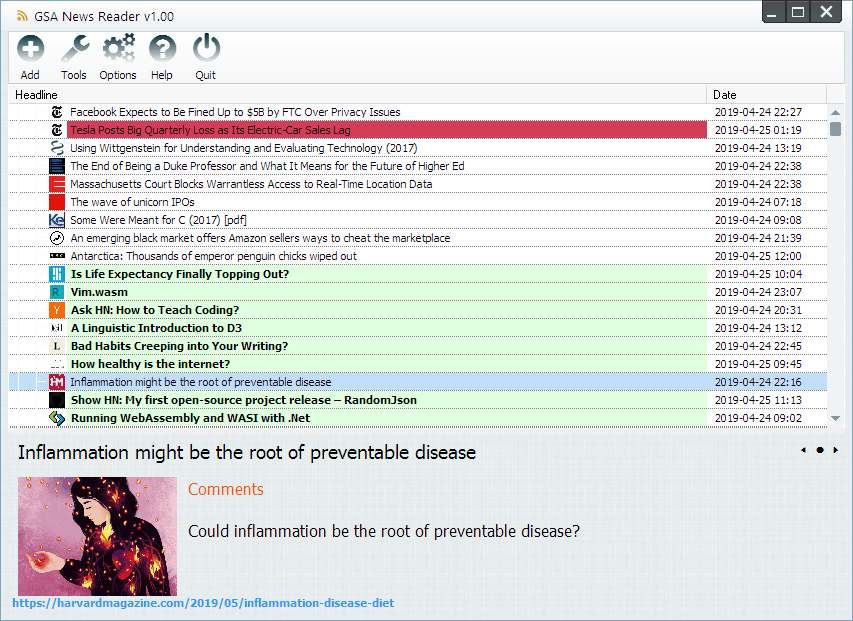
Monitor Any Website and RSS Feed with Ease
The program effortlessly processes any web protocol, content format, or feed URL. Add your favorite blogs, news portals, or forums to the dashboard to scan headlines simultaneously. Say goodbye to cluttered browser tabs and distracting ad banners-experience pure, unfiltered information.
Smart News Tagging & Custom Highlight Filters
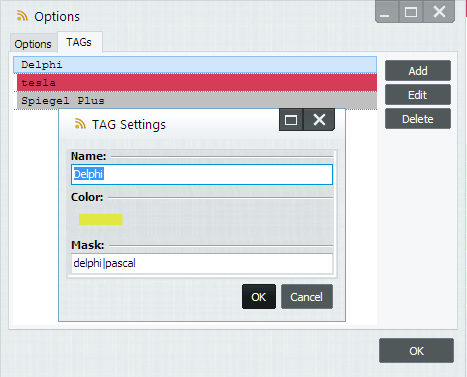
Take full control of your daily information stream. The tool automatically tags incoming articles based on your personal keyword preferences. You can assign custom background and font colors to specific headlines, allowing you to filter critical industry updates from general noise in seconds.
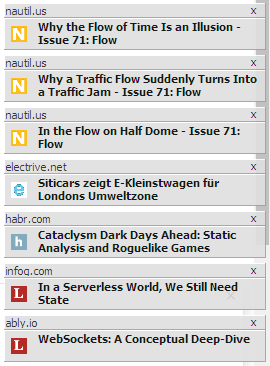
Instant Desktop Alerts: Never Miss a Critical Update
Stay ahead of your competition with automated background monitoring. The software scans your custom website list around the clock. The moment a change or a new article is detected, a quiet popup notification appears on your desktop, ensuring you react to breaking news immediately.
Content Monitoring Methods: How it Compares
Here is a comprehensive comparison table highlighting the unique advantages of the software against other popular solutions on the market.
| Feature / Metric | GSA News Reader | Standard Feed Readers (Feedly, Inoreader) | Enterprise Web Monitors (Visualping, Changetower) | Manual Browser Curating (Bookmarks / Open Tabs) |
|---|---|---|---|---|
| Pricing Model | One-time payment (True Lifetime License) | High monthly or annual SaaS subscription tiers | Expensive usage-based fees (Pay-per-check metrics) | Free, but drains massive administrative labor hours |
| Non-RSS Monitoring | Tracks regular HTML pages and forums natively | Fails completely if a website lacks a native RSS feed | Supported, but consumes credits rapidly | Requires visiting every site manually to spot updates |
| Ad and Tracker Shield | Built-in text extractor strips banners & trackers | Requires premium paid plans to remove host platform ads | Captures raw page images (including ads & cookie walls) | Exposes your system to infinite native site ad scripts |
| Alert Delivery Speed | Real-time local desktop popup notifications | Relies on delayed email logs or app refreshes | Fast, but restricted by your monthly plan budget tier | Zero automation; you only see news when you look for it |
| Data Privacy Control | 100% localized offline storage and indexing | Reading habits and site feeds stored on cloud servers | Tracking pipelines managed entirely on cloud systems | Browser caches log your active digital footprint |
| Organization Tools | Automated color-coded tags based on custom keywords | Folder grouping only (Advanced tags hidden behind paywalls) | Visual diff tracking (Good for changes, poor for reading) | Chaotic desktop folders and unorganized browser history |
Frequently Asked Questions (FAQs)
► What makes GSA News Reader different from standard RSS readers?
Unlike traditional feed readers that only accept native RSS or ATOM links, GSA News Reader can monitor standard HTML web pages. If your favorite blog, forum, or news portal does not offer a dedicated RSS feed, you can simply paste the website's regular URL. The software will track the site and notify you the moment new content is published.
► Can I filter and organize my incoming news feeds?
Yes. It features a powerful Smart Tagging and Highlight Filter system. You can set up custom keyword rules so that incoming articles are automatically categorized. You can also assign unique background and font colors to specific topics, allowing you to instantly spot critical industry updates while filtering out irrelevant noise.
► Does it block advertisements?
Yes. The software extracts the core text and images from the feeds and web pages, stripping away distracting online banners, pop-ups, and trackers. This gives you a clean, minimalist, and ultra-fast reading environment without the need for external browser adblockers.
► What does the "Lifetime License" include?
Our lifetime license is a one-time payment with zero recurring monthly or annual subscription fees. It includes free lifetime updates, meaning you will get all future software optimization patches, bug fixes, and major feature upgrades completely free of charge.
► Which operating systems are supported?
It is built natively as a high-performance Windows application. However, it runs flawlessly on macOS and Linux systems using compatibility layers like Wine, Parallels Desktop, or CrossOver, as well as on Windows-based Virtual Private Servers (VPS).
► Is there a free trial available?
Yes. You can download a fully functional free trial version directly from our website. This allows you to test all monitoring features, import your existing feeds, and experience the desktop notification system before deciding to purchase a permanent license.