
GSA File Rescue: Recover Corrupted & Legacy Media Data
GSA File Rescue saves your data from unreadable CDs, DVDs or other media and lets you open them again. We often store important files on media like floppy disks or CDs. Unfortunately, the saved data usually gets lost sooner or later due to aging media or damage.
This is a professional-grade, non-destructive utility designed to salvage data from unreadable storage drives, damaged media and corrupted files by bypassing standard OS read-errors. It features deep bit-by-bit scanning, legacy media support for older formats and a 100% risk-free, read-only process to recover valuable documents and multimedia.
- Deep Bit-by-Bit Analysis: Scans deep within file structures to extract raw data, completely bypassing standard operating system read-errors.
- Legacy Media Optimization: Specialized algorithms to forcefully read and salvage data from degraded floppy disks, ZIP drives and vintage formats.
- Scratch-Resistant Recovery: Recovers lost multimedia and data from heavily scratched, aged or degraded CD, DVD and Blu-ray optical media.
- 100% Non-Destructive Process: Operates in a strict, risk-free read-only mode that never modifies or overwrites your original damaged files.
- Automated Error Skipping: Automatically identifies unrecoverable bad blocks and skips them to keep scanning without freezing your system.
- Universal File System Support: Fully compatible with all major Windows architectures, including modern NTFS, FAT32 and legacy FAT16 formats.
Instant Data Recovery for Unreadable, Scratched or Degraded Disks
Recover your files from media such as DVDs, CDs, SD-Cards or floppy disks. Recover unreadable CD/DVD, it is easy to get access to it again with our software.
Read damaged CDs or DVDs
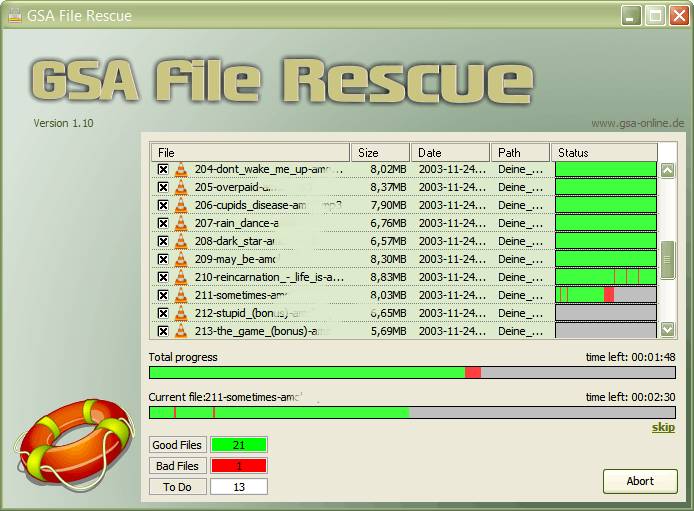
You will always have an excellent overview of the progress of the data recovery process. You will see every detail of what could be rescued and what was impossible to recover by the indicating colors.
Advanced File Extraction & Automated Batch Recovery Modes
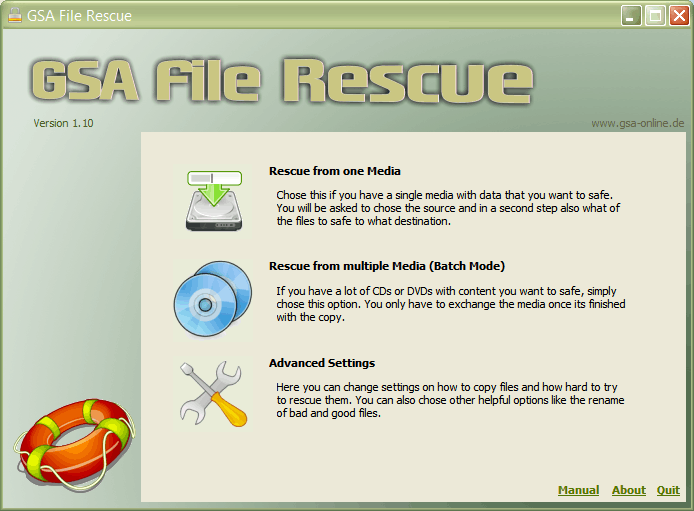
In case you have a lot of damaged floppies disks, scratched CDs or damaged DVDs, it is easy to change the media in the drive and let the program do the data rescue automatically. No need to click any buttons as the drive opens up and automatically continues the data recovery for the next inserted CD or disk.
Forensic Data Salvage for Retro Hardware and Digital Archives
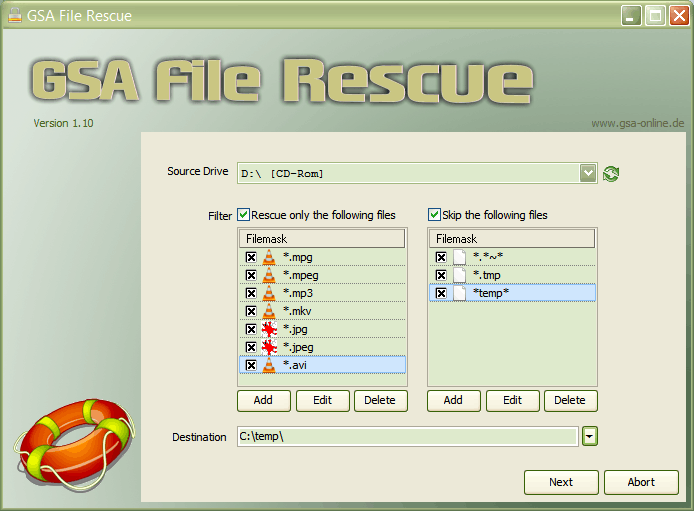
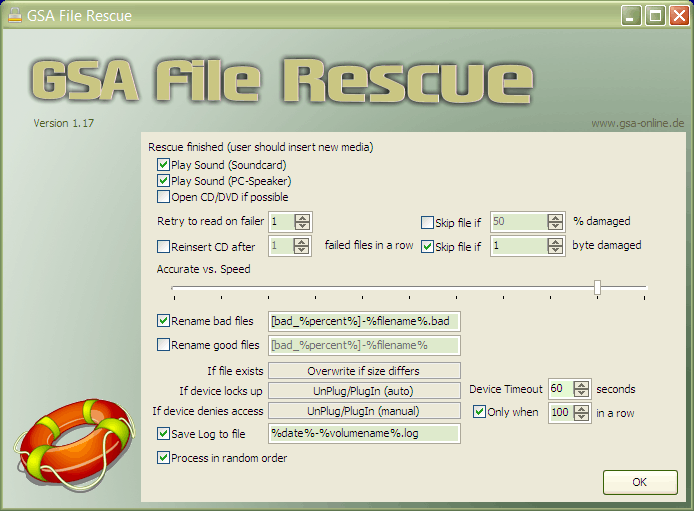
It is easy to set up every little aspect of the tool for your best data recovery. You can automatically rename bad, damaged files or skip the recovery totally. You have full control of every rescue setting available.
Data Recovery Methods: How GSA File Rescue Compares
Here is a comprehensive comparison table highlighting the unique advantages of the software against other popular solutions on the market.
| Feature / Metric | GSA File Rescue | Cloud Data Recovery Software (SaaS / Subscriptions) | Premium Forensic Suites (Enterprise Level) | Free File Undelete Tools (Basic Recuva / Windows File Recovery) |
|---|---|---|---|---|
| Pricing Model | One-time payment (True Lifetime License) | High recurring monthly or annual subscription fees | Extremely expensive enterprise licensing | Free, but heavily ad-supported or limited capabilities |
| Legacy Media Salvage | Specialized algorithms for floppy disks, Zip drives & vintage media | No support for legacy drive physical sector layouts | Excellent support, but costs thousands of dollars | Restricted to modern connected drives only |
| Optical Drive Parsing | forcefully reads scratched, degraded CD, DVD & Blu-ray | Mostly ignores hardware-level optical read issues | Supported, but requires specialized training to use | Fails completely on physically scratched optical discs |
| System Resilience | Automated error skipping prevents freezing on bad blocks | Often hangs, crashes, or times out on severe bad sectors | Highly advanced, but uses resource-heavy desktop setups | Freezes the host operating system when hitting corrupt blocks |
| Automated Batch Processing | Hands-free multiple disc recovery (Auto-opens tray for next media) | Manual file-by-file or single-drive recovery only | Complex custom scripts required to automate batch queues | Requires manual click-throughs for every single scan task |
| Data Integrity Guard | 100% non-destructive, risk-free read-only operation | Safe, but often forces online cloud-sync caching | Safe, but highly complex forensic image staging required | Safe for reading, but can accidentally trigger drive stress |
| Learning Curve | Straightforward, user-friendly Windows utility | Easy interface, but tied to confusing cloud settings | Deep learning curve requiring professional training | Command-line driven or highly technical parameter boxes |
Frequently Asked Questions (FAQs)
► How do I recover data from corrupted media or unreadable drive?
To recover files from a corrupted media, you need a utility that bypasses standard operating system constraints. When Windows encounters a bad sector or file error, it usually aborts the copy process entirely. GSA File Rescue solves this by performing a deep, byte-by-byte scan. It reads around the damaged sectors, salvages every intact piece of data and reconstructs the file so you do not lose your entire archive.
► Can you salvage from severely scratched CDs, DVDs or Floppy Disks?
Yes. Scratched optical media and degraded legacy disks cause standard disk drives to freeze or throw read-errors. Our data salvage software uses advanced hardware-level communication to forcefully read unstable media. By adjusting the reading parameters and skipping unrecoverable blocks, it extracts the maximum possible data from old, physically degraded or scratched storage formats.
► Is it safe to use on failing or unstable hard drives?
Absolutely. The software operates in a 100% risk-free, non-destructive read-only mode. It never writes to the source drive or modifies the original corrupted file. This prevents further wear and tear on failing hardware or accidental overwrites, making it completely safe for sensitive digital archiving and forensic recovery.
► What file systems and storage media formats are supported?
The software is highly versatile and supports all major Windows file systems including NTFS, FAT32 and even FAT16. It can salvage from a wide variety of hardware, including:
- Standard internal and external HDDs/SSDs
- USB flash drives and SD cards
- Optical media (CD-R, CD-RW, DVD-R, DVD-RW)
- Legacy storage (Floppy disks, Zip drives and vintage media)
► Does this software work on Windows 11 and Windows 10?
Yes. While the product is highly optimized for legacy media preservation, it is fully compatible with modern operating systems, including Windows 11, Windows 10, 8 and 7** (both 32-bit and 64-bit architectures).
► Can I try it for free before purchasing?
Yes. We offer a free trial download that allows you to scan your corrupted media and see exactly what files can be salvaged. Once you verify that your files are recoverable, you can purchase a license key to fully extract and save your restored data.
► Do I need a monthly subscription?
No. GSA File Rescue comes with a lifetime license and free lifetime updates. There are no hidden costs or recurring fees.